
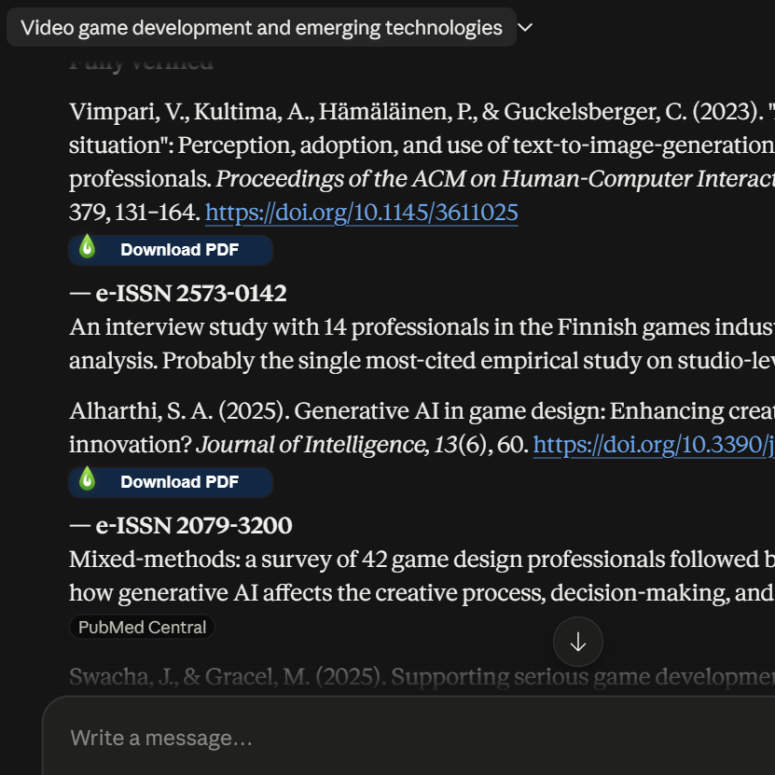
LibKey Nomad is a browser extension available to you and your students that helps you access Champlain College Library and open-access resources while browsing the web. When the LibKey Nomad browser extension has been added to your browser and configured for Champlain College, it will add access buttons to scholarly articles behind paywalls as well as to citations within bibliographies on sites like Wikipedia. It now also works with bibliographies generated by AI chat tools like Claude, provided they are accessed in your web browser. As long as the generated reference entries contain DOIs, they might lead to a LibKey Nomad button popping up.
A couple of use cases we’ve found so far:
- Want to easily access all of the sources cited in a particular article? Upload the article to a Claude chat and instruct it to extract sources from the bibliography that have DOIs and display them in the chat window. As long as you are accessing Claude from your browser with LibKey Nomad enabled, you can then use the access buttons to reach the full text of each cited source (or place an interlibrary loan request for it if it is not available).
- You may know that asking an LLM like Claude to generate citations for you without providing any grounding risks hallucinations: citations for sources that sound plausible but do not actually exist. While this happens less frequently than it did with early AI models a few years ago, it’s still an active issue. LibKey Nomad can assist in verifying that a source is genuine. The creator of LibKey products, ThirdIron, focused much of its pre-release testing on preventing the LibKey Nomad button from appearing on hallucinated citations. I still recommend clicking through and ensuring that either an article or an interlibrary loan request form opens up (and that this information matches the generated citation) just to rule out any malfunction. And by the way, a LibKey Nomad button not popping up for a reference entry does not necessarily mean that the citation is hallucinated or otherwise incorrect; there are some genuine articles that they cannot yet detect.
You can learn more about LibKey Nomad on our LibKey guide. You can learn how to use it in Claude with our Getting Started with LibKey Nomad Claude Project (available to users with Champlain organization Claude accounts only. For best results, access this project in a browser rather than the Claude app).